Import duty calculator
for Alibaba and AliExpress
Classify any product into an HTS code and get the full duty breakdown, right on the product page. No tab-switching, no manual lookups.
A screenshot of the DutyDesk Chrome extension overlaying an Alibaba product page, showing a duty breakdown with HTS code, base rate, Section 301 tariff, and total landed cost.
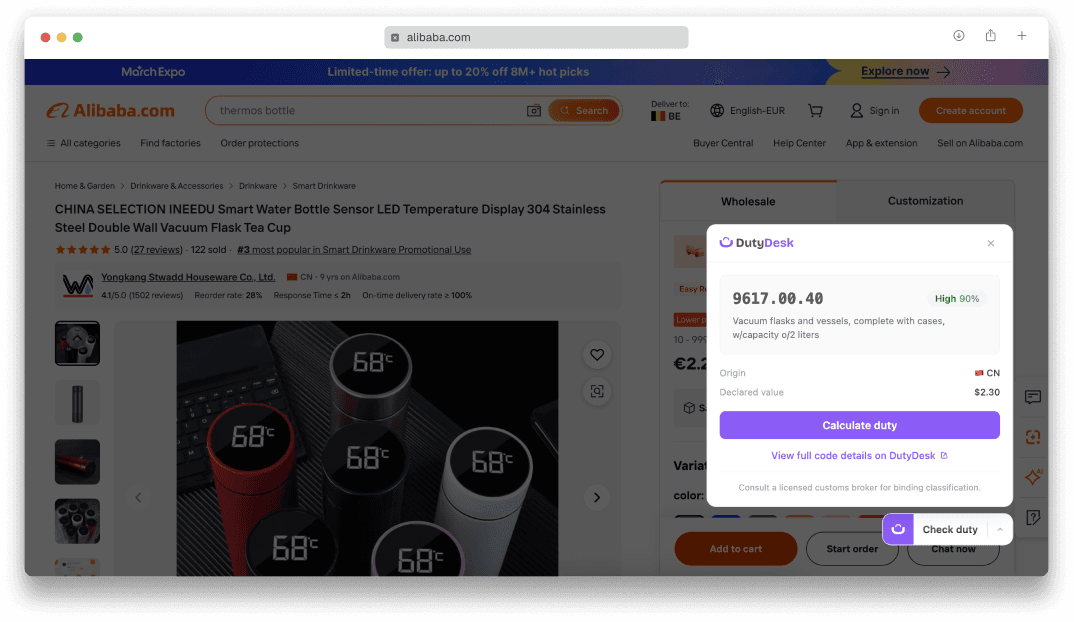
Classify, calculate, and compare while you source
HTS classification, full duty breakdown, and origin comparison on every product page.
AI tariff classification
The extension reads the product title and description, then classifies it into the correct HTS or TARIC code. Confidence score included.
Every duty and fee, line by line
Base rate, Section 301 tariffs, antidumping duties, and any other trade actions. Line-by-line, with the legal basis for each charge.
Side-by-side origin comparison
Compare duty rates across sourcing countries. See how switching from China to Vietnam or Mexico changes your landed cost.
Total landed cost calculation
Enter the product value and get the total landed cost: product price plus every duty and fee applied at the border.
Works on Alibaba and AliExpress
The extension activates automatically on product pages. Support for more sourcing platforms is planned.
How it works
Install the extension
Add DutyDesk to Chrome from the Chrome Web Store. Sign in with your DutyDesk account or create one.
Browse Alibaba or AliExpress
Open any product page. The DutyDesk badge appears automatically in the bottom-right corner.
Get the duty breakdown
Click the badge to classify the product and calculate the full import duty. Compare origins, save to a project.
What you need
A DutyDesk account
The extension uses your API key to authenticate requests.
Classification credits
AI classification uses credits from your plan. Pro: 50/mo. Business: 250/mo.
Google Chrome
Chromium-based browsers (Chrome, Edge, Brave, Arc) are supported.
Questions
Which sites does the extension work on?
Alibaba.com and AliExpress.com product pages. The extension activates automatically when you visit a product page on either site. Support for more sourcing platforms is planned.
Does classification use credits?
Yes. Each AI classification uses one credit from your plan. Pro: 50 credits/mo. Business: 250 credits/mo. Duty calculations do not use classification credits.
Can I calculate duty without classifying?
Yes. If you already know the HTS code, enter it manually in the extension panel and calculate duty directly. Classification is optional.
Does the extension work in Edge, Brave, or Arc?
Yes. Any Chromium-based browser can install extensions from the Chrome Web Store. The extension works identically in Chrome, Edge, Brave, and Arc.
Is my data shared with third parties?
No. The extension sends product descriptions to the DutyDesk API for classification only. No data is shared with advertisers, analytics providers, or other third parties.
Still have questions?
Get in touch →Know the duty before you buy
Install the extension and get landed cost calculations on every Alibaba and AliExpress product page.
Add to Chrome