US and EU duty rates,
inside Google Sheets
Look up duty rates, calculate landed cost, and classify products with spreadsheet formulas. Seven custom functions, USITC and TARIC data in every cell.
Three screenshots showing the DutyDesk Google Sheets add-on: calculating import duty with a formula, comparing duty rates across sourcing countries, and bulk classifying product descriptions into HTS codes.
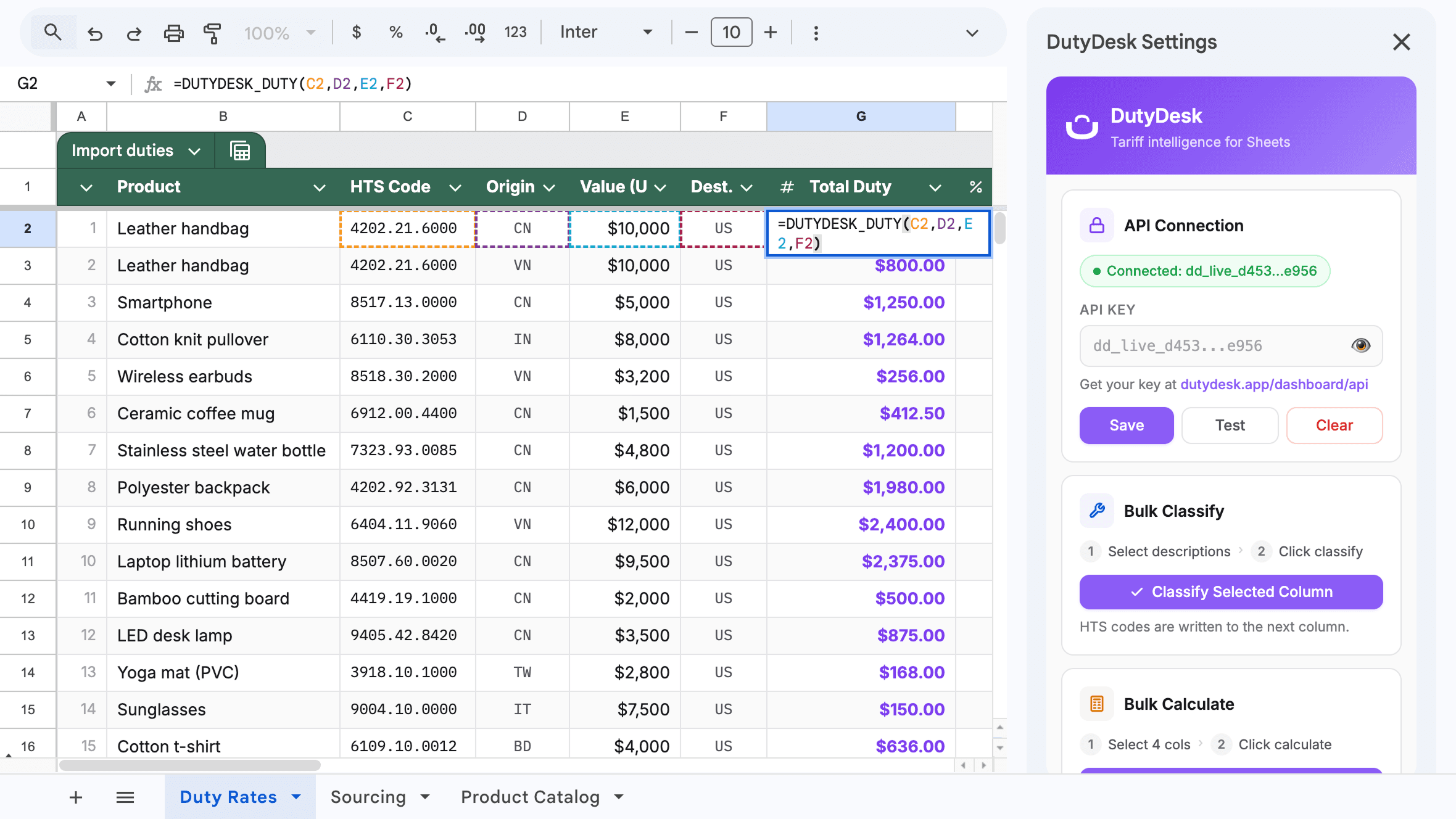
Calculate the total duty for any HTS code, origin, and customs value
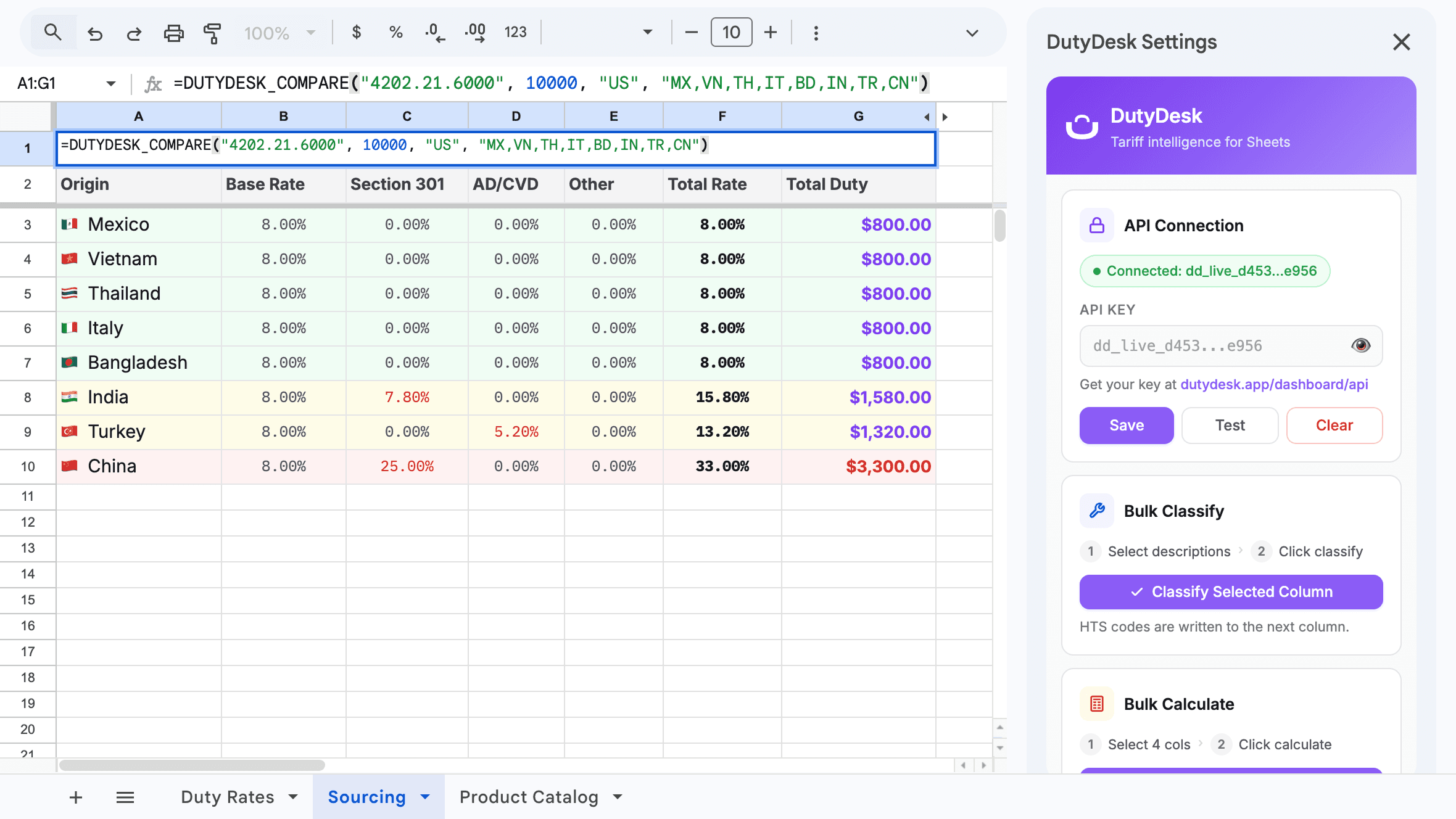
Compare landed cost across sourcing countries side by side
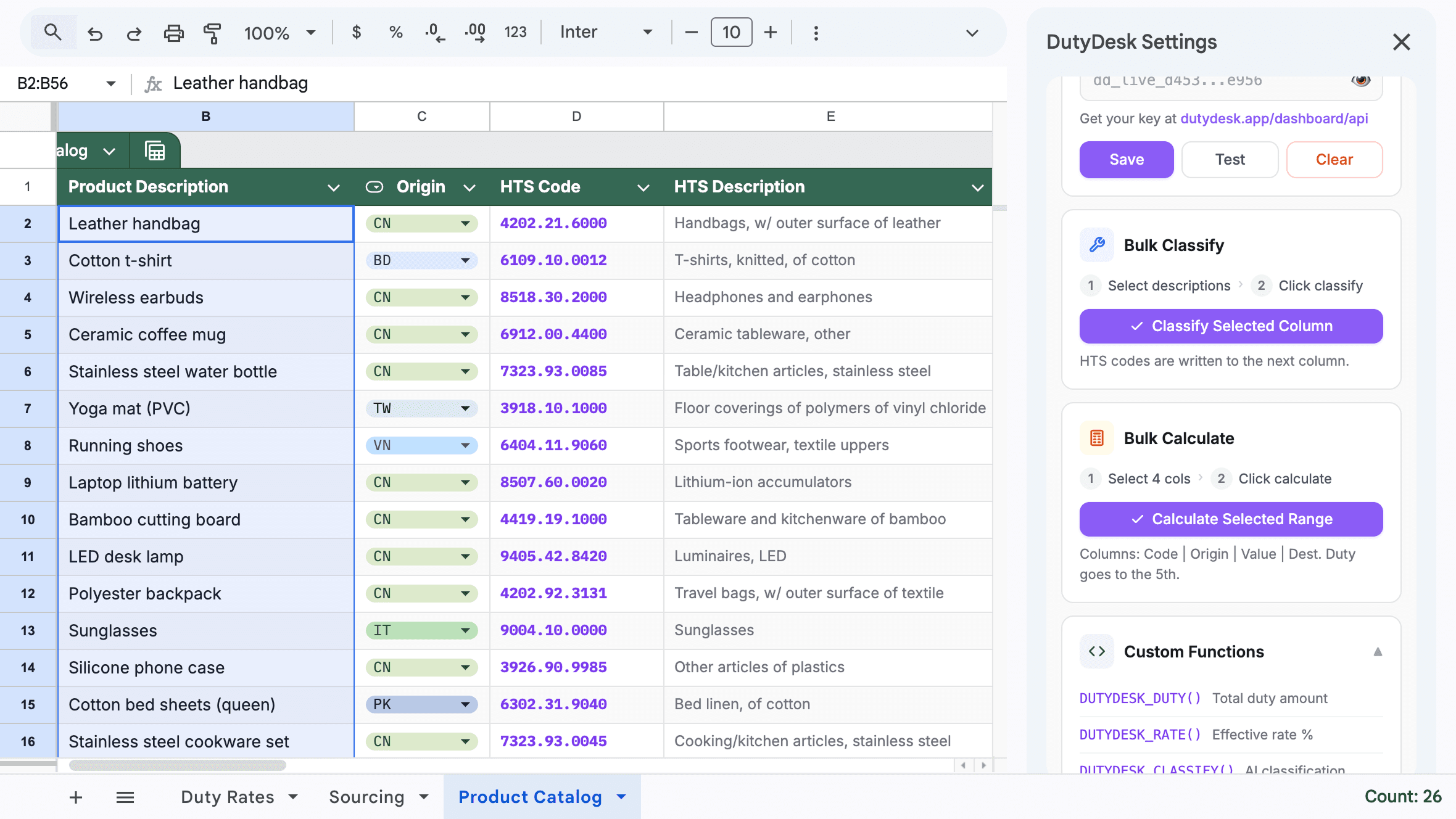
Classify hundreds of product descriptions into HTS codes at once
Seven formulas, every tariff operation
Duty rates, landed cost, AI classification, and origin comparison as native spreadsheet functions.
Duty rates as spreadsheet functions
Type =DUTYDESK_DUTY() in any cell. The add-on calls the DutyDesk API and returns the total import duty for that HTS code, origin, and customs value.
=DUTYDESK_DUTY()Side-by-side origin comparison
DUTYDESK_COMPARE returns a table of duty costs across sourcing countries. See how China, Vietnam, Mexico, and India stack up in one formula.
=DUTYDESK_COMPARE()AI classification in bulk
DUTYDESK_CLASSIFY takes a product description and returns the best-match HTS or TARIC code. Bulk classify an entire column from the sidebar.
=DUTYDESK_CLASSIFY()Up to 50 items per API call
Select a range and run bulk classify or bulk calculate from the sidebar. Results written directly into your sheet.
50 items/batchCustom functions
Type these directly in any cell. Each call uses one API request from your plan.
| Function | Example | Returns |
|---|---|---|
| DUTYDESK_DUTY | =DUTYDESK_DUTY("4202.21.6000", "CN", 10000, "us") | Total duty amount ($3,300) |
| DUTYDESK_RATE | =DUTYDESK_RATE("4202.21.6000", "CN", "us") | Effective rate as decimal (0.33) |
| DUTYDESK_CLASSIFY | =DUTYDESK_CLASSIFY("leather handbag", "us") | Top HTS code suggestion |
| DUTYDESK_LOOKUP | =DUTYDESK_LOOKUP("4202.21.6000", "us") | Description and MFN rate |
| DUTYDESK_SEARCH | =DUTYDESK_SEARCH("phone case", "us", 5) | Array of matching codes |
| DUTYDESK_BREAKDOWN | =DUTYDESK_BREAKDOWN("4202.21.6000", "CN", 10000, "us") | Multi-row breakdown (MFN, 301, MPF, HMF) |
| DUTYDESK_COMPARE | =DUTYDESK_COMPARE("4202.21.6000", 10000, "us", "CN,VN,MX,IN") | Side-by-side duty by origin country |
How it works
Install the add-on
Get DutyDesk from the Google Workspace Marketplace. It adds a DutyDesk menu to every spreadsheet.
Enter your API key
Open DutyDesk > Settings in the menu bar. Paste your API key from dutydesk.app/settings/api-keys.
Use the formulas
Type =DUTYDESK_DUTY(), =DUTYDESK_CLASSIFY(), or any of the 7 custom functions directly in a cell.
What you need
A DutyDesk account with an API key
Generate a key at dutydesk.app/settings/api-keys. The add-on stores it in your personal Google user properties.
Pro or Business plan
Every formula call uses one API request. Pro: 500 calls/mo. Business: 2,500 calls/mo.
Google Sheets
Works in any Google Sheets spreadsheet. Desktop and web. No other software required.
Questions
How many formula calls can I make?
Each formula call uses one API request from your plan. Pro: 500 requests/mo. Business: 2,500 requests/mo. Bulk operations from the sidebar use one request per batch of up to 50 items.
Does it work with Excel?
The add-on is built for Google Sheets. For Excel, use the REST API directly or connect via Power Query. The same endpoints power both the add-on and the API.
Can I classify products in bulk?
Yes. Select a range of product descriptions and run bulk classify from the DutyDesk sidebar. Up to 50 items per batch, results written directly into your sheet.
What data does the add-on access?
The add-on calls the DutyDesk API with your API key. It reads cell values you pass to formulas and writes results back. It does not access other spreadsheet data or external services.
Which tariff codes are covered?
Every US HTS code from USITC and every EU TARIC code. The same data that powers dutydesk.app.
Still have questions?
Get in touch →Tariff intelligence in your spreadsheet
Install the add-on and get duty rates, landed cost calculations, and AI classification as formulas.
Get the add-on